
Customer note for products
In this article
With the customer note, your customers can enter additional information when purchasing a product (e.g. personalizations or notes). The customer note can be activated individually per product.
Enable customer note
Open the advanced settings of a product and activate the Customer note. Define the customer note as a required field if needed or assign a custom label.

Display in the online shop
If the customer note is activated, the input field is displayed on the product detail page in the online shop.

Display in the cart
The entered note is displayed during the checkout process directly with the respective product in the cart. Multiple identical products can be added with different notes.

Display in the order overview
The entered notes are also visible in the final order overview.

Order management
In the order management, the note is listed directly with the respective items. Currently, a note cannot be edited. 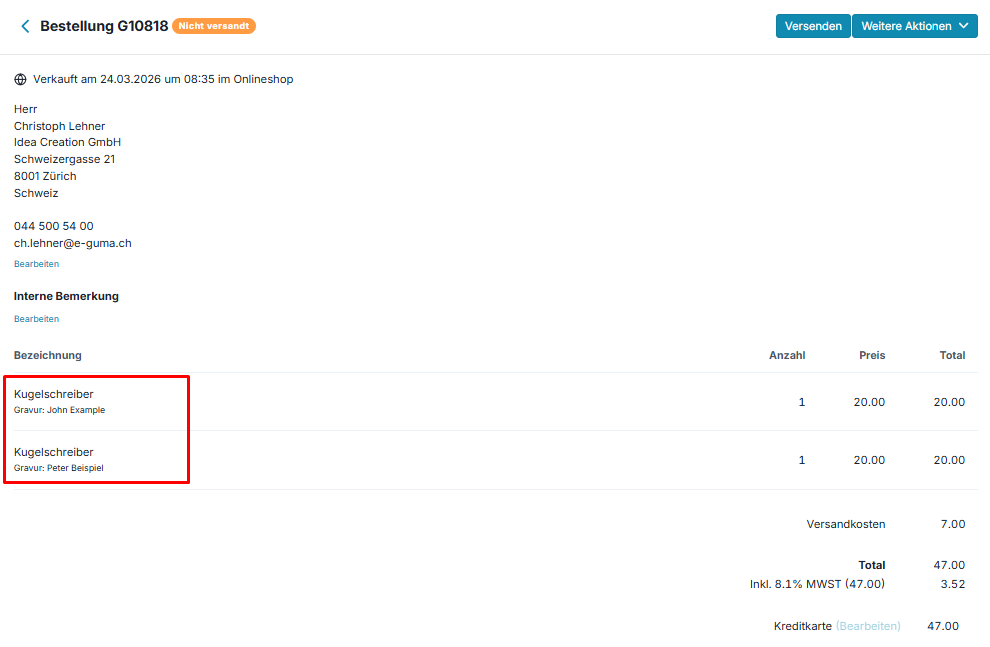 The entered note is also displayed when shipping the corresponding items.
 The entered note is also displayed when shipping the corresponding items.

Display on invoice and receipt
Customer notes are also shown on the invoice and the receipt.
